Additional button on command processing screen
I'm trying to add an additional button to the command processing screen.
This button should apear when the Feeder is blocked.
The relevant variable for this condition is
When pressed, the button should send a pulse command to
QUFxx_Blocked (Bool).When pressed, the button should send a pulse command to
QUFxx_RSB (Bool).I have created
- a smart object for my feeder bay
- a smart object for the Command Processing screen
Each feeder has:
-
QUFxx_COfor the command QUFxx_STfor the status
The screen currently looks like this:
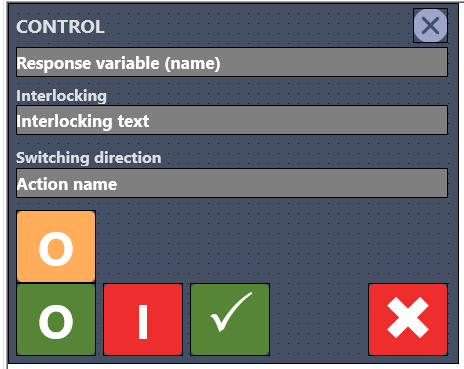

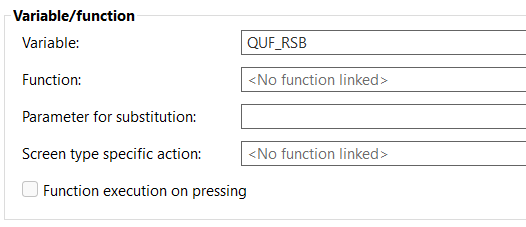
When I use the variables as described above, it seems the placeholder
QUF_ is not being replaced correctly — instead, it always becomes QUF02_Blocked and QUF02_RSB for all objects that use this smart object.Additionally:
-
When I use
*_Blockedand*_RSB, the buttons do not appear at all. -
When I use
QUF13_BlockedandQUF13_RSB, those values are applied to all objects.
For the command and status variables, everything works as expected (each feeder gets the correct variable substitution), but for this new button, the variable substitution doesn’t seem to work properly.
I have 13 feeders in total: QUF01 → QUF13.
In my variable list of the smart object all variables are defined as QUF_* so QUF_CO, QUF_ST, QUF_Blocked, QUF_RSB.
In my smart object I link the real variable eg: QUFxx_CO to the variable of the smart object QUFxx_QUF_CO